
Product Description
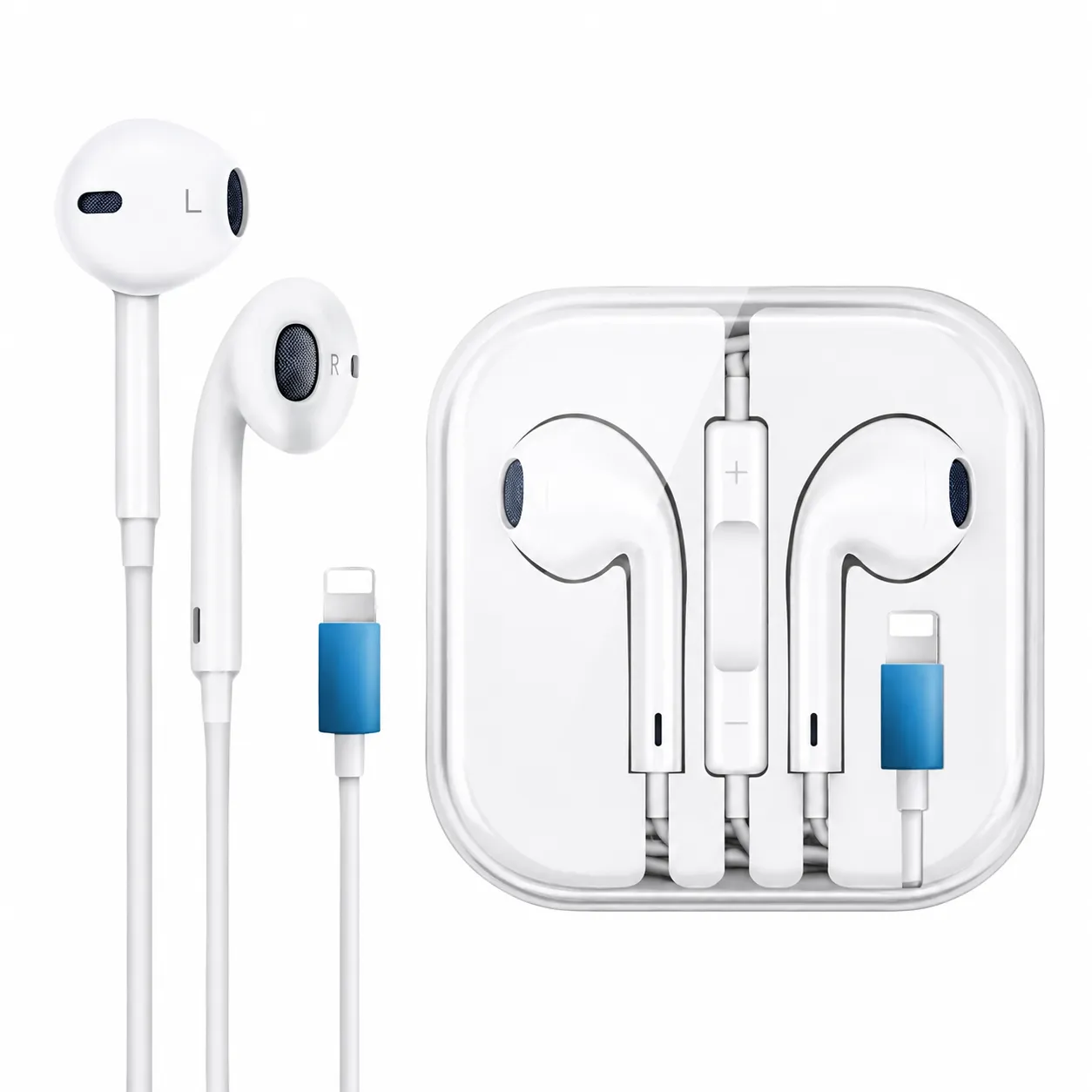
The iPhone Lightning Handsfree is designed for compatible iPhone, iPad and iPod touch models equipped with a Lightning port. Its direct wired connection provides stable sound without Bluetooth pairing, batteries or charging.
The contoured open-ear earpieces are shaped to rest naturally inside the ears without requiring silicone tips. Built-in speakers deliver clear stereo audio with balanced vocals and bass for music, podcasts, movies, calls and online meetings.
An integrated microphone allows you to make hands-free calls, record voice messages and communicate through supported applications. The three-button inline remote provides convenient control over volume, audio playback and incoming calls without repeatedly using your phone.
Apple’s official Lightning EarPods compatibility requirements cover devices with a Lightning connector running iOS 10 or later. Official Lightning EarPods reference
Key Features
- Direct Lightning connector
- Plug-and-play wired operation
- No Bluetooth pairing required
- No battery or charging required
- Clear left and right stereo audio
- Built-in microphone for calls and recordings
- Three-button inline remote
- Volume-up and volume-down controls
- Music and video playback control
- Call answering and ending functions
- Voice-assistant activation on supported devices
- Comfortable open-ear earpiece design
- Left and right side markings
- Suitable for music, videos, calls and gaming
- Compatible with supported Lightning-port Apple devices
Technical Specifications
| Specification | Details |
|---|---|
| Product name | iPhone Lightning Handsfree |
| Product type | Wired stereo earphones |
| Connector | Lightning |
| Wearing style | Open-ear earbud |
| Audio output | Left and right stereo |
| Microphone | Integrated inline microphone |
| Remote | Three-button inline remote |
| Remote buttons | Volume up, multifunction centre button and volume down |
| Bluetooth | Not required |
| Internal battery | Not required |
| Charging | Not required |
| Power source | Connected device |
| Pairing | Plug-and-play |
| Primary compatibility | iPhone, iPad and iPod touch with Lightning connector |
| Software requirement | iOS 10 or later |
| Cable type | Fixed wired cable |
| Package quantity | One pair of wired earphones |
Inline Remote Functions
Volume Control
- Press + to increase the volume.
- Press – to decrease the volume.
Music and Video Controls
- Press the centre button once to play or pause.
- Press it twice quickly to skip to the next track.
- Press it three times quickly to return to the previous track.
- Press it twice and hold on the second press to fast-forward.
- Press it three times and hold on the third press to rewind.
Call Controls
- Press the centre button once to answer an incoming call.
- Press it again to end the current call.
- Press the centre button to switch between supported active and incoming calls.
- Press and hold the centre button to reject a call where supported.
Voice Assistant
Press and hold the centre button to activate Siri on a compatible iPhone or iPad.
Control functions can vary slightly depending on the device, application and manufacturing version.
Compatible iPhone Models
Directly compatible with Lightning-port iPhones running a supported version of iOS, including:
- iPhone 14, 14 Plus, 14 Pro and 14 Pro Max
- iPhone 13, 13 mini, 13 Pro and 13 Pro Max
- iPhone 12, 12 mini, 12 Pro and 12 Pro Max
- iPhone 11, 11 Pro and 11 Pro Max
- iPhone XS, XS Max and XR
- iPhone X
- iPhone 8 and 8 Plus
- iPhone 7 and 7 Plus
- iPhone 6s and 6s Plus
- iPhone 6 and 6 Plus
- iPhone SE models with a Lightning port
- Earlier supported Lightning-port iPhones running iOS 10
Other Compatible Devices
- Lightning-port iPad models with compatible software
- Lightning-port iPad mini models
- Lightning-port iPad Air models
- Compatible iPad Pro models with Lightning
- Supported iPod touch models
Important Compatibility Information
- This product connects directly to a Lightning port.
- It does not connect directly to USB-C iPhones.
- iPhone 15 and later models require a compatible USB-C-to-Lightning audio adapter.
- It cannot connect directly to a 3.5mm headphone socket.
- The connected device must support digital audio through Lightning.
- Control and microphone functions can vary if the product is not certified for Apple devices.
- If an “Accessory Not Supported” message appears, disconnect the earphones, clean the port and reconnect them.
Reviews
There are no reviews yet.