
Product Description
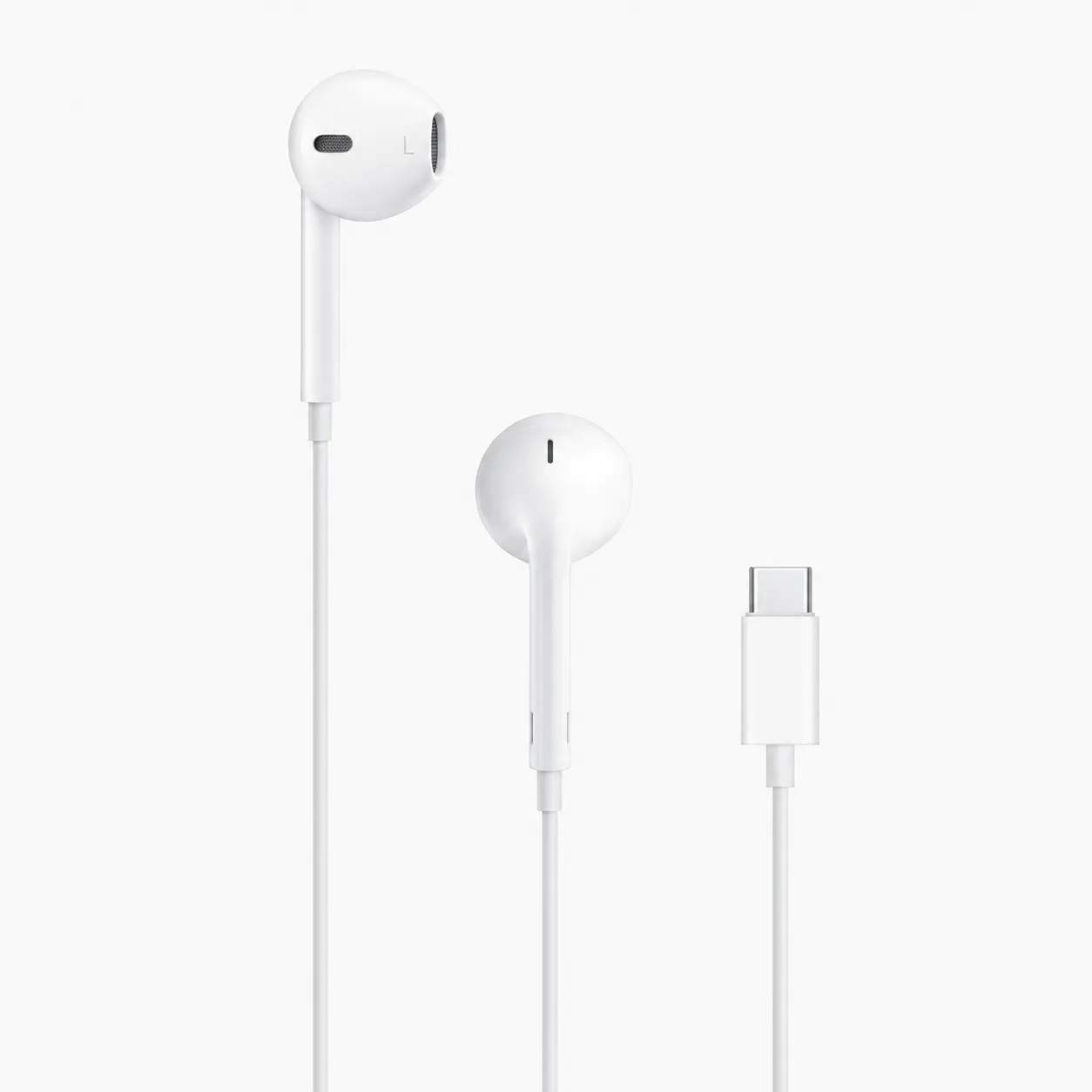
The EarPods USB-C Wired Earphones provide a convenient plug-and-play listening experience for compatible USB-C devices. Simply connect them to a supported USB-C port and start listening—no Bluetooth setup, charging case or internal battery is required.
The earphones are shaped around the natural geometry of the ear, helping provide a comfortable fit for more users than traditional circular earbuds. Their open-ear construction allows comfortable everyday use without silicone tips.
Integrated speakers are engineered to maximise sound output and deliver high-quality audio with clear vocals and deep, rich bass. They are suitable for music, podcasts, videos, phone calls, online meetings and voice recordings.
An inline remote and microphone let you adjust the volume, control audio and video playback, answer or end calls and activate Siri on supported Apple devices. These functions are confirmed on the official Apple EarPods USB-C product page.
Key Features
- Direct USB-C wired connection
- Plug-and-play operation
- No Bluetooth pairing required
- No battery or charging required
- High-quality stereo sound
- Deep and rich bass response
- Built-in microphone for calls and recordings
- Three-button inline remote
- Volume-up and volume-down controls
- Music and video playback controls
- Call answering and ending controls
- Siri activation on supported Apple devices
- Comfortable open-ear construction
- Left and right side markings
- Protection from sweat and water
- Compatible with supported USB-C iPhones, iPads and Macs
Technical Specifications
| Specification | Details |
|---|---|
| Product name | EarPods USB-C |
| Product type | Wired stereo earphones |
| Connector | USB Type-C |
| Wearing style | Open-ear earbud |
| Audio channels | Left and right stereo |
| Microphone | Integrated inline microphone |
| Remote | Three-button inline remote |
| Remote buttons | Volume up, centre button and volume down |
| Bluetooth | Not required |
| Internal battery | Not required |
| Charging | Not required |
| Power source | Connected USB-C device |
| Pairing | Plug-and-play |
| Primary compatibility | Supported USB-C iPhone, iPad and Mac models |
| Other compatibility | USB-C devices supporting digital USB audio |
| Sweat and water protection | Yes; no official IP rating stated |
| Package quantity | One pair of wired earphones |
Inline Remote Controls
Volume Controls
- Press + to increase the volume.
- Press – to decrease the volume.
Music and Video Controls
- Press the centre button once to play or pause.
- Press it twice quickly to skip forward.
- Press it three times quickly to skip backward.
- Press it twice and hold on the second press to fast-forward.
- Press it three times and hold on the third press to rewind.
Call Controls
- Press the centre button once to answer an incoming call.
- Press it again to end the current call.
- Press the centre button to switch between supported current and incoming calls.
Voice Assistant
- Press and hold the centre button to activate Siri on a supported Apple device.
Apple documents the centre button’s playback, call and Siri functions in its EarPods control guide. Some functions may vary when the earphones are connected to a non-Apple device.
Official Apple Compatibility
According to Apple, EarPods USB-C require:
- A Mac with USB-C running macOS Monterey 12.6 or later
- An iPad with USB-C running iPadOS 16.4 or later
- An iPhone with USB-C running iOS 17 or later
They may also work with Android phones, tablets, Windows computers and other devices that support digital audio through USB-C. Microphone and remote-control compatibility can vary between manufacturers.
How to Use
- Insert the USB-C connector into a compatible device.
- Wait for the device to recognise the earphones.
- Open your preferred music, video or calling application.
- Adjust the volume using the inline remote.
- Remove the connector gently after use by holding the plug rather than pulling the cable.
No pairing code, application or charging process is required.
Recommended Uses
- Music and podcasts
- Voice and video calls
- Online meetings
- Online classes
- Video streaming
- Mobile gaming
- Voice recordings
- Travelling and commuting
- Everyday wired listening
Advantages of a Wired Connection
- No battery can run out during use
- No wireless pairing process
- Stable audio connection
- Minimal audio delay
- No charging case required
- Immediate plug-and-play operation
- Convenient inline volume and call controls
- Suitable as a primary or backup pair of earphones
Important Compatibility Information
- These earphones connect directly through USB-C.
- They cannot connect to a traditional 3.5mm headphone socket without additional compatible equipment.
- They cannot connect to a Lightning port without a suitable adapter.
- A USB-C charging port does not always guarantee USB audio support.
- Some Android devices may require USB audio or OTG settings to be enabled.
- Volume, microphone and centre-button functions may vary on non-Apple devices.

Reviews
There are no reviews yet.