
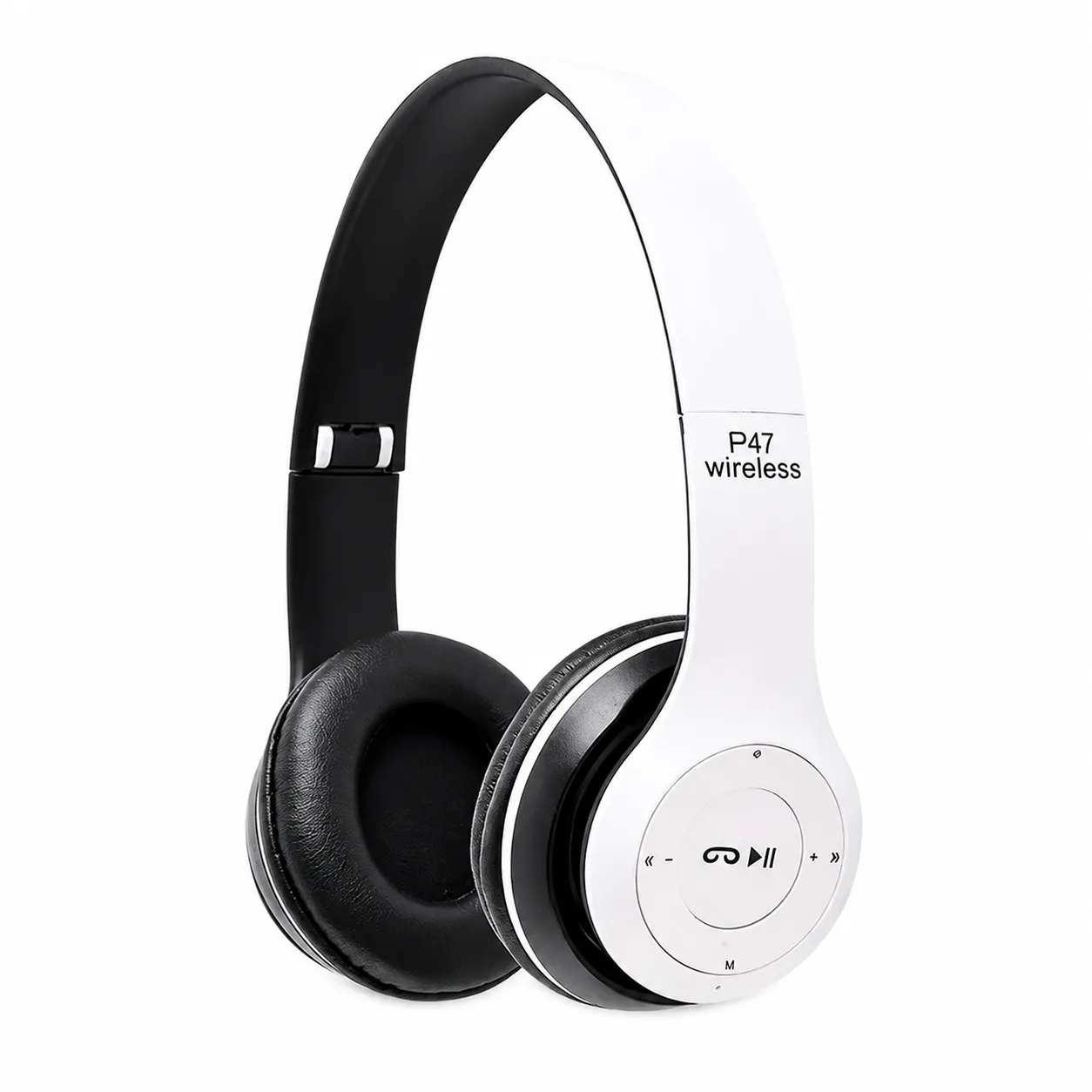
Product Description
The P47 Wireless Bluetooth Headphones combine several audio options in one lightweight and portable headset. Connect wirelessly to a smartphone, tablet, laptop or other Bluetooth-enabled device, or use the 3.5mm AUX input when a wired connection is preferred.
A built-in TF card slot allows compatible audio files to be played directly without connecting a phone. The integrated FM receiver provides access to available local radio stations, making the headphones useful even when no mobile data or music-streaming service is available.
Cushioned ear pads and an adjustable headband provide a comfortable fit for different users. The folding construction makes the headphones easier to store and carry. Integrated controls let you adjust the volume, change tracks, manage calls and switch between Bluetooth, TF-card and FM modes.
The P47 Stereo 5.0 manual confirms Bluetooth 5.0, wireless/MP3/FM modes, built-in call controls and multifunction playback buttons. P47 Stereo 5.0 user manual
Key Features
- Bluetooth 5.0 wireless connectivity
- Stable connection within approximately 10 metres
- Built-in microphone for hands-free calls
- Wireless and wired listening modes
- Standard 3.5mm AUX input
- TF/microSD memory-card playback
- Built-in FM radio
- 40mm dynamic audio drivers
- Stereo sound with enhanced bass
- Cushioned on-ear ear pads
- Adjustable headband
- Foldable, travel-friendly construction
- Music and call controls on the earcup
- Volume-up and volume-down controls
- Previous-track and next-track controls
- Rechargeable internal battery
- Compatible with smartphones, tablets, laptops and computers
Technical Specifications
| Specification | Details |
|---|---|
| Product model | P47 |
| Product type | Wireless on-ear headphones |
| Bluetooth version | Bluetooth 5.0 + EDR |
| Wireless frequency | 2.402–2.480GHz |
| Wireless range | Up to approximately 10 metres |
| Driver size | Approximately 40mm |
| Frequency response | Approximately 50Hz–20kHz |
| Impedance | Approximately 32 ohms |
| Signal-to-noise ratio | Approximately 88dB |
| Maximum output | Approximately 35mW |
| Battery capacity | Approximately 150–200mAh |
| Music time | Approximately 3–6 hours |
| Call time | Up to approximately 6 hours |
| Charging time | Approximately 2 hours |
| Charging input | 5V Micro-USB |
| Wired connection | 3.5mm AUX |
| Memory-card support | TF/microSD, commonly up to 32GB |
| FM frequency range | 87.5–108MHz |
| Microphone | Built in |
| Controls | Physical earcup buttons |
| Material | ABS with cushioned ear pads |
| Folding design | Yes |
| Audio modes | Bluetooth, AUX, TF/MP3 and FM radio |
P47 headphones are produced in several batches, so battery capacity, Bluetooth version and playing time can vary.
Control Functions
Power and Multifunction Button
- Press and hold for approximately three seconds to turn the headphones on or off.
- Press once to play or pause music.
- Press once to answer or end an incoming call.
- Press and hold during an incoming call to reject it.
- Press twice to redial the most recent number on supported phones.
Previous and Volume-Down Button
- Press once to return to the previous track.
- Press and hold to reduce the volume.
- In FM mode, press to move to the previous station or frequency.
Next and Volume-Up Button
- Press once to move to the next track.
- Press and hold to increase the volume.
- In FM mode, press to move to the next station or frequency.
Mode Button
Press the M button to switch between supported modes:
- Bluetooth
- TF-card/MP3 playback
- FM radio
Bluetooth Pairing Instructions
- Charge the headphones before first use.
- Press and hold the power button until the indicator activates.
- Open the Bluetooth settings on your phone or other device.
- Select P47 from the available-device list.
- Confirm the connection.
- Start playing music or answering calls.
After the initial pairing, the headphones should reconnect automatically to the last available device.
TF-Card Playback
- Copy compatible audio files onto a TF or microSD card.
- Insert the card gently into the headphone’s card slot.
- Turn the headphones on.
- Press the mode button until MP3 mode is selected.
- Use the previous, next and play/pause buttons to control playback.
MP3 is the most commonly supported audio format. Card capacity and supported file formats can vary by batch.
FM Radio Instructions
- Turn the headphones on.
- Press the mode button until FM mode is selected.
- Press the play/pause button to begin automatic station scanning, where supported.
- Wait for the available stations to be saved.
- Use the previous and next buttons to change stations.
FM reception depends on signal strength, location and surrounding interference. Connecting the AUX or charging cable may improve reception on some versions by acting as an antenna.
Wired AUX Mode
- Connect a 3.5mm audio cable to the headphone’s AUX input.
- Connect the other end to a compatible phone, tablet, computer or music player.
- Start audio playback from the connected device.
When AUX mode is used, some earcup controls and the built-in microphone may not function. This depends on the included cable and connected device.
Charging Instructions
- Connect the supplied Micro-USB cable to the charging port.
- Connect the other end to a suitable 5V USB power source.
- Allow approximately two hours for a full charge.
- Disconnect the cable when charging is complete.
Do not use an incompatible high-voltage charger. The available P47 manual specifies 5V USB charging, approximately two-hour charging and a 10-metre wireless range.
Compatibility
Compatible with:
- Android smartphones and tablets
- iPhones and iPads
- Windows laptops and computers with Bluetooth
- Mac computers
- Bluetooth-enabled televisions
- MP3 and MP4 players
- Devices with a standard 3.5mm audio output
- TF/microSD memory cards
Reviews
There are no reviews yet.